I have updated this posts as the information has become incorrect.
Looking for historic compositions of indexes can be frustrating and disappointing. A database like Datastream covers many indexes (not all composed of equities). But it forces the user to download a composition for every year, resulting in many duplicates.
Compustat is better at delivering historic compositions, but the number of indexes that actually do provide historic compositions in Compustat is limited.
Earlier I made an overview of indexes in Compustat Global.
This post focuses on Compustat North America.
Update:
In 2017 (March) I have been able to download compositions of indexes
S&P 500 and S&P 1500 super composite* over 2005-2015
US Indexes (non-sector limited) providing compositions
S&P 1500 Super composite
S&P Smallcap 600 Index
S&P 400 growth
S&P 500/Barra Growth Index
S&P 500/Barra Value Index
S&P 100-Ltd
S&P 500 Comp-Ltd
Nasdaq 100
Nyse is absent
If you search the entire database, given a time window you can get an idea which indexes are covered.
*: Datastream constituent list:
This one is hidden.
Method > search in navigator for constituent list with term 1500
Select LS&P15XX < datastream doesn't give any descriptive information on this index
Back in de menuthis will provide the current composition
ad LS&P15 with month and year, e.g. being LS&P15XX1294
DATASTREAM AND COMPUSTAT COMPARED: HERE
Showing posts with label constituent list. Show all posts
Showing posts with label constituent list. Show all posts


2/11/2014
All stocks from a region in exchanges - Compustat
Students often ask me how to get data from al stocks from contry A, perferably from stock exchange B
(with a lot of links to other blog items)
The least complex merthod is by using Compustat. Sometimes it possible to download historic compositions from certain indexes.
Earlier I explained how and where < this link >
But chances are -m see the lists - there are no historic compositions available.
The easiest (but largest) method is doing it like this.
1. Select e.g. Compustat North America (only S&P compositions)
2. Fundamentals Annual
3. Select your time scope
4. Click link "search entire database"
5. Make certain to select in Screening variables Ïndustry format also FS (fiancials)
6. Select all in Idfentifying information, including Stock Exchange code (for filtering later on)
Searching Data items with CTRL-F:
a. LOC (location, country code) > tells location of head quarters (for filtering later on)
b. Financial data items like balance sheet data and income statement (blog items)
Output format: recommended is Tab delimited TXT (no data loss opening in spread sheet programs)
Date format, by preference
Download and wait untill ready. Open your download in Excel.

Now use Auto filter.
When you want to use this output in either Compustat, of Datastream, copy identifiers, e.g. into another file and Remove Duplicates (excel TAB data)

In our example criterium ISIN

Now use this file in other databases.
(with a lot of links to other blog items)
The least complex merthod is by using Compustat. Sometimes it possible to download historic compositions from certain indexes.
Earlier I explained how and where < this link >
But chances are -m see the lists - there are no historic compositions available.
The easiest (but largest) method is doing it like this.
1. Select e.g. Compustat North America (only S&P compositions)
2. Fundamentals Annual
3. Select your time scope
4. Click link "search entire database"
5. Make certain to select in Screening variables Ïndustry format also FS (fiancials)
6. Select all in Idfentifying information, including Stock Exchange code (for filtering later on)
Searching Data items with CTRL-F:
a. LOC (location, country code) > tells location of head quarters (for filtering later on)
b. Financial data items like balance sheet data and income statement (blog items)
Output format: recommended is Tab delimited TXT (no data loss opening in spread sheet programs)
Date format, by preference
Download and wait untill ready. Open your download in Excel.
Now use Auto filter.
When you want to use this output in either Compustat, of Datastream, copy identifiers, e.g. into another file and Remove Duplicates (excel TAB data)
In our example criterium ISIN
Now use this file in other databases.
10/07/2013
Compustat Global - Index Constituents code lookup
Lately code lookup (Step 2) in Index Constituents of Compustat Global has become impossible.
The WRDS tream working is on a solution.
For the time being the customers can use the provided list of GVkeys codes
NOT AVAILABLE ANYMORE
150008 FTSE 100 Index
150013 FTSE 250 Index
AVAILABLE
GVKEYX Index Name
115114 Jasdaq Index
150007 Composite DAX Index
150012 BSE 100 Index
150021 SBF 250 Index
150022 Helsinki General Index (HEX)
150033 KLSE Composite Index
150034 Madrid Stock Exchange Index
150039 IPC Index-Mexico
150051 Hang Seng Index
150061 Australian All Ordinary Index
150067 Strait Times-Singapore Index
150069 Nikkei 225 Index
150070 Swiss Market Index
150072 TAIWAN WEIGHTED INDEX
150077 Tokyo Stock Exchange Second Section Stock Price Index
150086 Brazilian Bovespa Index
150093 CAC 40 Index
150095 Deutscher Aktienindex (DAX) Index
150098 Athens Stock Exchange General Index
150099 S&P 700 Index
150147 S&P ASX 20 Index
150151 ATX Index
150152 Belgium 20 Index
150155 S&P ASX ALL AUSTRALIAN 50 INDX
150171 SBF 120 Index
150184 Bombay Stock Exchange Sensitive Index
150192 Nikkei 300 Index
150194 Topix Index
150196 INMEX Index
150262 Amsterdam AEX - Index
150267 OBX Index
150270 WARSAW WIG Index
150280 Swiss Performance Index - SPI
150339 Hang Seng H share index
150340 OMX Copenhagen 20 Index
150343 ATX 50 Index
150352 Milan MIB 30 Index
150354 PSI 20 Index
150355 Korea Stock Price 200 Index
150356 HDAX
150376 Dow Jones STOXX 600 Price Index
150377 Dow Jones STOXX 50 Index
150378 Dow Jones European STOXX Index
150912 S&P Euro Plus Index
150913 S&P Euro Index
150915 S&P Latin America 40 Index
150916 S&P/Topix Index (Japan) Index
150917 S&P United Kingdom Index
150918 S&P Global 1200 Index
150919 S&P Global 100 Index
150927 S&P Europe 350 Index
150928 Euronext 100 Index
150940 Dow Jones Euro STOXX 50 Index
150944 JSE/FTSE Top 40 Index
151012 S&P Asia 50 Index
151013 S&P ASX 50 Index
151015 S&P Japan 500 Index
151020 S&P ASX 100 Index
151210 Budapest Stock Exchange Index
151227 OMX Stockholm 30 Index
151229 Merval Index
151232 IBEX 35 Index
151312 New Zealand Stock Exchange 50 Index
151337 ISE 30 Index
153256 Deutscher Aktien MDAX (Perf) Index
15356 LG CAP, Exchange HDAX
153376 S&P ASX 200 Index
153432 Deutschier Aktien TECDAX (Perf)
160134 OMX Helsinki 25 Index
160136 Tokyo SE Real estate
Index ticker code
I6UKN059 Dow Jones Euro Stoxx 600
The WRDS tream working is on a solution.
For the time being the customers can use the provided list of GVkeys codes
NOT AVAILABLE ANYMORE
150008 FTSE 100 Index
150013 FTSE 250 Index
AVAILABLE
GVKEYX Index Name
115114 Jasdaq Index
150007 Composite DAX Index
150012 BSE 100 Index
150021 SBF 250 Index
150022 Helsinki General Index (HEX)
150033 KLSE Composite Index
150034 Madrid Stock Exchange Index
150039 IPC Index-Mexico
150051 Hang Seng Index
150061 Australian All Ordinary Index
150067 Strait Times-Singapore Index
150069 Nikkei 225 Index
150070 Swiss Market Index
150072 TAIWAN WEIGHTED INDEX
150077 Tokyo Stock Exchange Second Section Stock Price Index
150086 Brazilian Bovespa Index
150093 CAC 40 Index
150095 Deutscher Aktienindex (DAX) Index
150098 Athens Stock Exchange General Index
150099 S&P 700 Index
150147 S&P ASX 20 Index
150151 ATX Index
150152 Belgium 20 Index
150155 S&P ASX ALL AUSTRALIAN 50 INDX
150171 SBF 120 Index
150184 Bombay Stock Exchange Sensitive Index
150192 Nikkei 300 Index
150194 Topix Index
150196 INMEX Index
150262 Amsterdam AEX - Index
150267 OBX Index
150270 WARSAW WIG Index
150280 Swiss Performance Index - SPI
150339 Hang Seng H share index
150340 OMX Copenhagen 20 Index
150343 ATX 50 Index
150352 Milan MIB 30 Index
150354 PSI 20 Index
150355 Korea Stock Price 200 Index
150356 HDAX
150376 Dow Jones STOXX 600 Price Index
150377 Dow Jones STOXX 50 Index
150378 Dow Jones European STOXX Index
150912 S&P Euro Plus Index
150913 S&P Euro Index
150915 S&P Latin America 40 Index
150916 S&P/Topix Index (Japan) Index
150917 S&P United Kingdom Index
150918 S&P Global 1200 Index
150919 S&P Global 100 Index
150927 S&P Europe 350 Index
150928 Euronext 100 Index
150940 Dow Jones Euro STOXX 50 Index
150944 JSE/FTSE Top 40 Index
151012 S&P Asia 50 Index
151013 S&P ASX 50 Index
151015 S&P Japan 500 Index
151020 S&P ASX 100 Index
151210 Budapest Stock Exchange Index
151227 OMX Stockholm 30 Index
151229 Merval Index
151232 IBEX 35 Index
151312 New Zealand Stock Exchange 50 Index
151337 ISE 30 Index
153256 Deutscher Aktien MDAX (Perf) Index
15356 LG CAP, Exchange HDAX
153376 S&P ASX 200 Index
153432 Deutschier Aktien TECDAX (Perf)
160134 OMX Helsinki 25 Index
160136 Tokyo SE Real estate
Index ticker code
I6UKN059 Dow Jones Euro Stoxx 600
2/07/2013
Compustat Global/ Datastream Index constituents
When using Compustat it happens all too often that data isn't available or can't be found.
This particularly seems to apply to index constituents from the Compustat Global database.
Therefore I have tried to find out what indexes do provide output, and also, what time scope they cover.
On our blackboard there is an overview (under progress) of constituent indexes in Compustat and Datastream: Constituent Indexes Compustat and Datastream (press link)


The list is not yet complete and will be under review for the coming period, but since there are many questions on constituents in Compustat Global, I have already placed some.
As you can see the coverage of the indexes may vary between Datastream and Compustat.
This particularly seems to apply to index constituents from the Compustat Global database.
Therefore I have tried to find out what indexes do provide output, and also, what time scope they cover.
On our blackboard there is an overview (under progress) of constituent indexes in Compustat and Datastream: Constituent Indexes Compustat and Datastream (press link)
An image of that file can be seen in the following items


The list is not yet complete and will be under review for the coming period, but since there are many questions on constituents in Compustat Global, I have already placed some.
As you can see the coverage of the indexes may vary between Datastream and Compustat.
3/09/2010
Constituent list in Compustat
Translating exported worksets from Datastream into compustat can be tedious when it involves American companies, since it is not possible to upload ISIN lists in Compustat North America.
Fortunately Compustat contains it own consituent section.
In that section you can make retrieve (historic) compositions of e.g. S&P indexes.
Example S&P 500

Here are the necessary steps:
Select the desired identifier:

Look up the codes for S&P 500

Type in the name and memorise the identifier(s)


For the S&P 500 and S&P 1500 historical indexes the codes are:
S&P 500 (S&P 500 Comp-Ltd) codes: GVKEYX: 000003, TIC: I0003
S&P 1500 (S&P 1500 Super Composite) codes: GVKEYX: 031855, TIC: I0020

Now it is time to select variables desired,
Index information such as CONM (indexname) and TIC (ticker)
Company information like CONM (company name, mind the section), TIC (Ticker), CUSIP, SIC (Standard Industry Code) and NAICS.
Finally the output format.
It's a good idea to export the output as a TAB delimited TEXT file as it is ridded of all hidden coding, which might influence the presentation of the data when opening in a specific program (Excel, for instance).

Submit your query.
Check this page how to work with your output: click here
End result.

Also noteworthy: Mark B. has a nice contribution to this subject (click link )
Fortunately Compustat contains it own consituent section.
In that section you can make retrieve (historic) compositions of e.g. S&P indexes.
Example S&P 500

Here are the necessary steps:
Select the desired identifier:

Look up the codes for S&P 500

Type in the name and memorise the identifier(s)


For the S&P 500 and S&P 1500 historical indexes the codes are:
S&P 500 (S&P 500 Comp-Ltd) codes: GVKEYX: 000003, TIC: I0003
S&P 1500 (S&P 1500 Super Composite) codes: GVKEYX: 031855, TIC: I0020

Now it is time to select variables desired,
Index information such as CONM (indexname) and TIC (ticker)
Company information like CONM (company name, mind the section), TIC (Ticker), CUSIP, SIC (Standard Industry Code) and NAICS.
Finally the output format.
It's a good idea to export the output as a TAB delimited TEXT file as it is ridded of all hidden coding, which might influence the presentation of the data when opening in a specific program (Excel, for instance).

Submit your query.
Check this page how to work with your output: click here
End result.

Also noteworthy: Mark B. has a nice contribution to this subject (click link )
10/19/2009
Datastream: User created Indices (UCI)
UCI (User Created Indices) are a powerful tool for evaluating different strategies.
October 2014 update:
Over time the menus structure has changed.
Starting with the menu options.
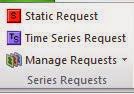
Depending on the information you want to download you can choose either Static (data that don't change over time) or Time Series data (such as financial information)
In this case we want to create an index and download a chart.
Pathway of selections: Time series > AEX > Equity Indices > Underlying constituent lists > constituent equities > selection of equities
Method:

 'Search'
In general, since you searched for a specific index, the most important index that applies will be presented on top of the list. Otherwise, next step is to press the link Equity Indices on d eleft side of the screen (Category).

Select the top one (the list is weighed, the more stars the better)

Press on the stars (the rule turns orange) and look at the bottom of the list: (note the information)
3 constituent lists

Press that link:

Again, when you select a rule (turns orange), you get extra information at the bottom.
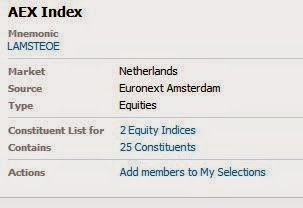
Press the link 25 constituents and select a couple of equities

At the top right of the page you can see this:

Press it. And mind the options presented:

Save as UCI (User Created Index)

Click: define index metadata

Result:

For more information on weighted indexes I refer to Wikipedia < click link
October 2014 update:
Over time the menus structure has changed.
Starting with the menu options.
Depending on the information you want to download you can choose either Static (data that don't change over time) or Time Series data (such as financial information)
In this case we want to create an index and download a chart.
Pathway of selections: Time series > AEX > Equity Indices > Underlying constituent lists > constituent equities > selection of equities
Method:
In general, since you searched for a specific index, the most important index that applies will be presented on top of the list. Otherwise, next step is to press the link Equity Indices on d eleft side of the screen (Category).
Select the top one (the list is weighed, the more stars the better)
Press on the stars (the rule turns orange) and look at the bottom of the list: (note the information)
3 constituent lists

Press that link:
Again, when you select a rule (turns orange), you get extra information at the bottom.
Press the link 25 constituents and select a couple of equities
At the top right of the page you can see this:

Press it. And mind the options presented:
Save as UCI (User Created Index)

Click: define index metadata
Result:

For more information on weighted indexes I refer to Wikipedia < click link
Subscribe to:
Posts (Atom)