Basic information on financial databases: cook books, tips and tricks & economic news

This blog contains schematic easy to grasp - hands on - help in performing searches in economic databases, making work sets and making them inter-exchangeable between the databases.

* Disclaimer. I am not a finance professional. Most posts are the result of personal findings.

Note:
All presented images are scaled and can be enlarged to original size (click the picture).

Search This Blog

Showing posts with label Bankscope. Show all posts

2/22/2016

Financial databases with IPOs, IPO-dates, company age, joint ventures.

In an ideal world all databases would contain all data and would be fully inter exchangeable.
This post aims an abridged overview of commonly used databases.
I deliberately chose not to focus solely on M&A databases.
Here are some databases.

For database with only publicly listed companies: date of incorporation (company age/ company founded) differs often from the IPO date, the date it went public. As for non public companies: no IPO date until further notice. But company age is retrievable.
Databases particularly concerning: Wharton/Compustat and Datastream (only listed companies)


AMADEUS (more Amadeus tips & tricks: here)
You can't find any data on deal types, IPOs etc. from the start menu.
So first you'll have to construct a workset of companies.
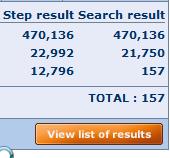
After your selections and opening the list of results, with VIEW list of results . . .


 . . . you can use  the link ADD at top right of the screen (image)
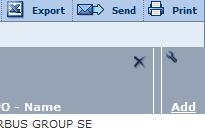


A new menu will open.
Note: this principle applies to all Bureau van Dijk databases: Amadeus, Bankscope, REACH, Zephyr etc.


If you can't find the desired data type, you can text search for it.
Give OK.


Joint ventures: a bit hidden
Follow above mentioned method.
Mergers & acquisitions.
Maybe it is sensible to make the selection from the start menu.
 ChooseMergers & acquisitions > M &A dels
A new window will open with selection boxes.


As you can see this conditional and focusses on a specific value. In this case, total assets.
Given the time period (-2 years) it ends up with this amount of joint-ventures.

Additional data can be gathered from the list of results.


BANKSCOPE (more bankscope tips & tricks: here)
(OECD countries)
You can't find any data on IPOs etc. from the start menu.
So first you'll have to construct a workset of companies.
On the other hand, there is the option to look for Mergers & Acquisitions


IPO date has to be searched separately: List of results > ADD > type in IPO date
After your selections and opening the list of results, with link ADD you can add extra data without further limiting your search


DATASTREAM: (for more Datastream tips & tricks: here)
Date company founded (WC18272 Static DATA)
(data SHOW as NA not available)


SDC (for SDC tricks and tips see: here)
SDC offers IPO data.
Global New Issues (GNI)
Settings for this example:
United States, all Public new issues, US common stock, time scope from 3rd January 2000 > on
In the Menu All Items, search words IPO
or browse through TAB Deal. E.g.: IPO date or IPO flag, select all IPOs.
Nr of IPOs: 3707

Make Custom Report >


I selected name, issue dates, filing date, offer price, shares offered . . . date founded


Secondary IPO data: M&A database
Most basic is to search in the menu 'All categories' searching for IPO
 
Most of presented items open new menu widows enabling to refine your search.
Looking for IPOs of companies involved in mergers and acquisitions is harder.
Maybe the following options is better.
I will stick to a limited set :
Period:01/01/2000
US targets
US acquirors
Deal value:  > $ 500M
Deal status: completed
Press Button Execute in the
TOP BAR
Nr of deals: 4006


Two options now:
Using menu, ALL Items, search word IPO >


Many of these IPO data are flags : (Y/N)
Mind: using IPO at this moment will limit your search considerably.

Better is to go to Custom report.


Again use the ALL Items, search word IPO, but now the data won't influence the size of your work set


After selecting the desired items, click OK > and say NO you don't want to go back select items.
Back in the main Menu. Execute your search.


Joint Ventures

M&A database > select joint ventures
All dates . . . Search all Items: Cross border . Y . . .  8723 hits
Make custom report to add extra data
Company names, name of the joint venture, nation, joint venture flag, status of the alliance . . .


Example.


WHARTON

(TO B
Amadeus
Ownership data : codes.
JO = Joint Venture


Compustat (North America, Compustat Global)
(more Compustat tips & tricks here)
Pathway:
Choose database > Fundamentals annual > search with CTRL-F: IPO date
WRDS explanation: This item is the date of a company's initial public stock offering. If the date of a company's initial public stock offering is not available, the first trading date in the major exchange is used.

CRSP
According to WRDS support, it should be somewhere under this data item: MSFHDR (stands for monthly security financial header, I believe)
De proper pathway is as follows: CRSP > Stock/ security files > stock header info >
The data items concerned are
Begin of stock data (in output labeled BEGDAT)
End of stock data (in output labeled ENDDAT)
Some additional complications will appear in a few cases when a firm (PERMCO) had multiple securities (PERMNOs). In those cases, you would need to take the oldest BEGDAT and the latest ENDDAT.

ZEPHYR (more Zephyr tips & tricks: here)
Zephyr has a focus on M&A data specifically
World wide and listed and unlisted companies
After your selections and opening the list of results, with link ADD you can add extra data without further limiting your search


After calling the view list of results and pressing the ADD link, this menu openns, which is devided in deal info, company info and advisor.


As you can see, you can text search info or unfold the categories.


List of results with added data

4/29/2014

Board information - Amadeus, Bankscope, REACH

Not all databases provide information on executive boards, governance or any other relevant board information.This post will seek to provide an overview of some databases that do.

Bureau van Dijk databases (Amadeus, Bankscope, REACH > focus: Europe) offer (in varying levels) board information that can be downloaded.
The method, however, does not vary.


  1. Make e.g. selections region: Germany, Netherlands, status: active, stock data: listed, legal form: public
  2. Press list of results (bottom)
  3. Open any company
  4. On the right side a new menus is presented, also with directors, managers, auditors, bankers etc information.(and maybe ownership info)


Choose previous for historic executives.
The options link is important in the presented list.
Confirm. Unfold for more info on the executive (check)
It is possible to limit the out to


Directors works the same.


When you press the option sections (top bar) you can add extra information to the directors information.


Next screen:
If you want to export directors info press the option on screen, otherwise it will not be saved.


 How to save all of this?

Export the data with X icon from the top bar
Select The output format. Maybe because of the specific sub database, not possible as text
A pop-up shows to select the save directory.

Be certain to use OPTIONS or else you will only download one record (the first)
There is a max number of downloadable records (50), so when using large worksets might result in many repeats.
THE CHOICE ALL INFO FOR EACH FILTERED DIRECTORS CAN RESULT IN VERY LARGE OUTPUT SETS.


If you wish you can save each company on a separate file.


Result


Each company gets another sheet
When downloading (called Export in Bureau van Dijk databases) the amount of possible output formats has increased. TAB delimited TXT, has vanished, however.


More board info in databases:

Database Asset4

In Compustat: Excecucomp

In Lexis/ Nexis (News)

In Audit analytics


5/15/2013

Tobin's Q Ratio. What is and where can I find it?

Tobin's Q Ratio provides information on how well a company's investments pay off.
This post focuses on  databases and the availability of the ratio or its components.

Tobin's Q

Market value of assets / replacement value of assets = TQ
or
(Equity Market value + liabilities market value) / (equity book value + liabilities book value) = TQ


On macroeconomic level:
Value of stock market / corporate net worth = TQ

Values larger than 1 say investments have been good.

Datastream:
Datatypes in red can be downloaded (In short: you can calculate the Tobin's Q ratio yourself.)

In Datastream it can be downloaded directly using the following formula
DPL#((X(WC08001) + X(WC03351)) / (X(WC03501) + X(WC03351)),6)

Put this rule in the data types field.
X stands for the selected equity or equities

The WC datatypes are datatypes from the balance sheet (provided by World Scope)
According to the formula liabilities book value and liabilities market value are the same (WC03351) = Total liabillities
 

Datatypes involved:

WC08001 = market capitalization (annual);  
MV = market value
WC03351 = total liabilities
WC03501 = common stock

Datastream output:


Tobin's Q can be calculated from the downloaded data.


Using the formula:
DPL#((H:AH(WC08001)+H:AH(WC03351))/(H:AH(WC03501)+H:AH(WC03351)),6)


Other Datastream formula's: (*expression builder/. finder in TSenu)
X(DWEV)/X(DWTA)*1000 (Tobin's Q 2)

(MARKET VALUE OF FIRM AS CAPTURED BY ENTERPRISE VALUE DIVIDED BY BOOK VALUE OF TOTAL ASSETS)

(X(MVC)*1000.000+PAD#(X(WC03451)~PCUR,C)+PAD#(X(WC03251)~PCUR,C)+PAD#(X(WC03051)~PCUR,C))/PAD#(X(WC02999)~PCUR,C)


MARKET VALUE OF EQUITY PLUS BOOK VALUE OF PREF STOCK AND DEBT DIVIDED BY BOOK VALUE OF TOTAL ASSETS
WC03451, WC03251, WC03051, WC02999

 Also see: Ratios, values and other instruments from the balance sheet: Datastream


Compustat
Datatypes in red can be downloaded

Market value = MKVALT (North America database)
Calculation: stock price x number of shares  (Global database)

Liabilities: LT*
Market value = stock price x number of shares = MKVALT (North America)
Equity book value = Book value per share BKVLPS  (North America)
Liabilities book value = Liabilities market value = LT


!! Unfortunately these data can not be downloaded in the Global database !!

Formula North America:
(MKVALT + LT) / (BKVLPS + LT)

Output Microsoft


*) LT
This item represents current liabilities plus long-term debt plus other noncurrent liabilities, including deferred taxes and investment tax credit.
This item is a component of Assets ? Total/Liabilities and Shareholders' Equity ? Total (LSE).
This item is the sum of:
  1. Current Liabilities ? Total (LCT)
  2. Deferred Taxes and Investment Tax Credit (TXDITC)
  3. Liabilities ? Other (LO)
  4. Long-Term Debt ? Total (DLTT)  
Using google I found the following formula:
AT + (CSHO x PRCC_F) – CEQ / AT >> Total Assets + (Common stocks outstanding x price closing fiscal) –  CEQ 
(CEQ -- Common/Ordinary Equity – Total) / total assets

Addition Wharton (cop WWU Münster) Data items and ratio's in Wharton 

 Also see
Ratio's, values and other instruments from the balance sheet: Compustat

Amadeus (Bureau van Dijk). (focus on Europe; no banks no financials)


Market value of assets / replacement value of assets = TQ
or
(Equity Market value + liabilities market value) / (equity book value + liabilities book value) = TQ

Total liabilities = Assets - shareholders equity (book value per share x number of shares) = total liabilities
Equity book value: Total Assets - (total) liabilities = shareholders'equity (book value of equity)

Book value per share = Book value per equity / number of shares outstanding

Market value: stock price x number of shares
Amadeus only weekly, monthly and annually

            ( (stock price x number of shares) + (total assets - shareholder equity) )
___________________________________________________________________________   = TQ

( (book value per share x number of shares outstanding) + (total assets - shareholder equity) )

Also see: Ratios, values and other instruments from the balance sheet: Amadeus

Bankscope (Bureau van Dijk) Focus ob public banks
Search criteria in this example: active, listed, public, commercial banks from Neth, Ger and US

Market value of assets / replacement value of assets = TQ
or
(Equity Market value + liabilities market value) / (equity book value + liabilities book value) = TQ

Number of shares
Book value per share
Total assets
Stock price only weekly, monthy, annually
Market value: stock price x number of shares
Total liabilities = assets - book value per share
Total liabilities = Assets - shareholders equity (book value per share x number of shares) = total liabilities
Equity book value: Total Assets - (total) liabilities = shareholders'equity (book value of equity)

Book value per share = Book value per equity / number of shares outstanding

Tobin's Q:
                 ( (stock price x number of shares) + (assets - book  value per share) )
____________________________________________________________________________


( (book value per share x number of shares outstanding) + (total assets - shareholder equity) )