The most commonly used ratios in finance.
How to interpret the text:
Data types presented in RED are downloadable data
If ratios or their components are not ready for download I try to present ways to calculate them (indirectly)
1. Debt to equity ratio
2. Current ratio
3. Quick ratio
4. Return on equity (ROE)
5. Net profit margin
1. Debt-to-Equity Ratio
Total Liabilities / Shareholders Equity
Shareholder equity = book value x number of shares
Compustat
Direct download: DLC
DLC represents the total amount of short-term notes and the current portion of long-term debt (debt due in one year).
LT = Total liabilites
BKVLPS (book value per share)
(CSHO) Common Shares Outstanding
Formula:
LT / (BKVLPS x CSHO) = debt to equity
Amadeus
Book value per equity = Book value per share x number of shares outstanding
Instead of Book value of equity, Market Value ( MV) can be used (market capitalisation)
(closing price x shares outstanding)
In Amadeus only closing price frequencies monthly and weekly, not daily
And: market value per year can be downloaded
Total liabilities = current liabilities + long term liabilities
Formula:
Total debt / total (shareholder) equity = Total liabilities / (market capitalisation x number of shares outstanding) OR (market capitalisation x book value per share)
Datastream*
WC03351 Total liabilities:
WC03995 Shareholder equity: (book value per equity)
NOSH Number of shares outstanding
Instead of Book value of equity, Market Value ( MV) is used (market capitalization)
Market Value MV = share price (P) x number of shares (NOSH) (market capitalisation)
Formula:
1. WC03351 / WC03995
2. WC03351 / MV
*) using search terms debt equity ratio in datatypes provides to following data producing datatypes:
WC08231 (total debt % common equity); WC08221 (total debt % total capital/std); WC08231A (total debt % common equity); WC08231R (total debt % common equity) !! Not all companies provide data. Error types like No data values found; no world scope data; access denied
For more downloadables on income statement and balance sheet see this
2. Current Ratio (working capital ratio)
Current Assets / Current Liabilities
Compustat
Current assets total / current liabilities = current ratio
ACT = Current assets total
LCT = Current Liabilities - Total
Formula:
Current ratio = ACT / LCT
Amadeus
Formula:
Current ratio Current assets total / current liabilities
Datastream
Formula:
WC08106 Current ratio = (current assets total [WC02201] / current liabilities [WC03101] )
Only industrials apply
3. Quick Ratio (quick assets ratio)
(Current Assets – Inventories) / Current Liabilities
Compustat
INVT -- Inventories - Total
ACT = Current assets total
LCT = Current Liabilities - Total
Formula:
(ACT - INV) / LCT
Amadeus
Inventories not in AMADEUS
Datastream
Quick ratio WC08101
Inventories total WC02101
Current assets WC02201
Current liabilities WC03101
Formula:
(WC02201 - WC02101) / WC03101 = WC08101
Not all companies provide data
4. Return on Equity (ROE) (return on net worth)
Net Income / Shareholder's Equity or
(net earnings (after taxes) - preferred dividends) / common equity
Compustat
NI Net income
(BKVLPS x CSHO) shareholder equity
BKVLPS (book value per share)
CSHO Common Shares Outstanding
Formula:
NI / (BKVLPS x CSHO)
Amadeus
P/ L for period = Net Income
Book value per share x number of shares outstanding = Book value per equity
ROE using net Income %
Formula:
(P/L) / (Book value per share x number of shares outstanding) = ROE
Datastream
ROE (total): WC08301
WC03995 Shareholder equity: (book value per equity)
NOSH Number of shares outstanding
Instead of Book value of equity, Market Value ( MV) is used (market capitalization)
Market Value MV = share price (P) x number of shares (NOSH) (market capitalisation)
Formula: WC01001 / MV = WC08301 OR WC01001 / WC03995 = WC08301
5. Net Profit Margin
Net Profit / Net Sales
Compustat
Gross profit margin
Gross Income / Net Sales or Revenues * 100 = UGI / SALE x 100
Gross profit: GP (loss)
Gross income: UGI
. the difference between sales or revenues and cost of goods sold and depreciation.
Net sales or revenues: SALE (sales/turnover)
gross sales and other operating revenue less discounts, returns and allowances.
REVT = Revenue - total
GP = UGI / SALE x 100
Addition Compustat from (copyright) WWU Münster Data- items and ratios
Amadeus
Gross profit
Profit margin (%)
Sales
Formula:
Gross profit / sales (not exactly)
Datastream
DWNM = net profit margin
WC01001 Net sales or revenues
WC01540 Net profit( operating income)
* Components can't be all downloaded. Not all companies provide data
LINKS
Compustat: For more downloadables on income statement and balance sheet see this
Amadeus: For more downloadables on income statement and balance sheet see this
Datastream: for more downloadables on income statement and bsalance sheet, see this
Showing posts with label SDC. Show all posts
Showing posts with label SDC. Show all posts
8/16/2016


2/22/2016
Financial databases with IPOs, IPO-dates, company age, joint ventures.
In an ideal world all databases would contain all data and would be fully inter exchangeable.
This post aims an abridged overview of commonly used databases.
I deliberately chose not to focus solely on M&A databases.
Here are some databases.
For database with only publicly listed companies: date of incorporation (company age/ company founded) differs often from the IPO date, the date it went public. As for non public companies: no IPO date until further notice. But company age is retrievable.
Databases particularly concerning: Wharton/Compustat and Datastream (only listed companies)
AMADEUS (more Amadeus tips & tricks: here)
You can't find any data on deal types, IPOs etc. from the start menu.
So first you'll have to construct a workset of companies.
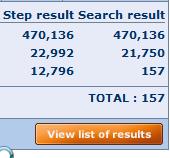
After your selections and opening the list of results, with VIEW list of results . . .
. . . you can use the link ADD at top right of the screen (image)
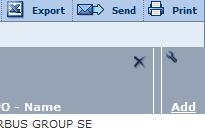
A new menu will open.
Note: this principle applies to all Bureau van Dijk databases: Amadeus, Bankscope, REACH, Zephyr etc.

If you can't find the desired data type, you can text search for it.
Give OK.

Joint ventures: a bit hidden
Follow above mentioned method.
Mergers & acquisitions.
Maybe it is sensible to make the selection from the start menu.
 ChooseMergers & acquisitions > M &A dels
A new window will open with selection boxes.

As you can see this conditional and focusses on a specific value. In this case, total assets.
Given the time period (-2 years) it ends up with this amount of joint-ventures.

Additional data can be gathered from the list of results.
BANKSCOPE (more bankscope tips & tricks: here)
(OECD countries)
You can't find any data on IPOs etc. from the start menu.
So first you'll have to construct a workset of companies.
On the other hand, there is the option to look for Mergers & Acquisitions


IPO date has to be searched separately: List of results > ADD > type in IPO date
After your selections and opening the list of results, with link ADD you can add extra data without further limiting your search
DATASTREAM: (for more Datastream tips & tricks: here)
Date company founded (WC18272 Static DATA)
(data SHOW as NA not available)
SDC (for SDC tricks and tips see: here)
SDC offers IPO data.
Global New Issues (GNI)
Settings for this example:
United States, all Public new issues, US common stock, time scope from 3rd January 2000 > on
In the Menu All Items, search words IPO
or browse through TAB Deal. E.g.: IPO date or IPO flag, select all IPOs.
Nr of IPOs: 3707
Make Custom Report >
I selected name, issue dates, filing date, offer price, shares offered . . . date founded

Secondary IPO data: M&A database
Most basic is to search in the menu 'All categories' searching for IPO

Most of presented items open new menu widows enabling to refine your search.
Looking for IPOs of companies involved in mergers and acquisitions is harder.
Maybe the following options is better.
I will stick to a limited set :
Period:01/01/2000
US targets
US acquirors
Deal value: > $ 500M
Deal status: completed
Press Button Execute in the
TOP BAR
Nr of deals: 4006
Two options now:
Using menu, ALL Items, search word IPO >

Many of these IPO data are flags : (Y/N)
Mind: using IPO at this moment will limit your search considerably.
Better is to go to Custom report.

Again use the ALL Items, search word IPO, but now the data won't influence the size of your work set

After selecting the desired items, click OK > and say NO you don't want to go back select items.
Back in the main Menu. Execute your search.
Joint Ventures

M&A database > select joint ventures
All dates . . . Search all Items: Cross border . Y . . . 8723 hits
Make custom report to add extra data
Company names, name of the joint venture, nation, joint venture flag, status of the alliance . . .
Example.

WHARTON
(TO B
Amadeus
Ownership data : codes.
JO = Joint Venture
Compustat (North America, Compustat Global)
(more Compustat tips & tricks here)
Pathway:
Choose database > Fundamentals annual > search with CTRL-F: IPO date
WRDS explanation: This item is the date of a company's initial public stock offering. If the date of a company's initial public stock offering is not available, the first trading date in the major exchange is used.
CRSP
According to WRDS support, it should be somewhere under this data item: MSFHDR (stands for monthly security financial header, I believe)
De proper pathway is as follows: CRSP > Stock/ security files > stock header info >
The data items concerned are
Begin of stock data (in output labeled BEGDAT)
End of stock data (in output labeled ENDDAT)
Some additional complications will appear in a few cases when a firm (PERMCO) had multiple securities (PERMNOs). In those cases, you would need to take the oldest BEGDAT and the latest ENDDAT.
ZEPHYR (more Zephyr tips & tricks: here)
Zephyr has a focus on M&A data specifically
World wide and listed and unlisted companies
After your selections and opening the list of results, with link ADD you can add extra data without further limiting your search


After calling the view list of results and pressing the ADD link, this menu openns, which is devided in deal info, company info and advisor.

As you can see, you can text search info or unfold the categories.
List of results with added data

This post aims an abridged overview of commonly used databases.
I deliberately chose not to focus solely on M&A databases.
Here are some databases.
For database with only publicly listed companies: date of incorporation (company age/ company founded) differs often from the IPO date, the date it went public. As for non public companies: no IPO date until further notice. But company age is retrievable.
Databases particularly concerning: Wharton/Compustat and Datastream (only listed companies)
AMADEUS (more Amadeus tips & tricks: here)
You can't find any data on deal types, IPOs etc. from the start menu.
So first you'll have to construct a workset of companies.
After your selections and opening the list of results, with VIEW list of results . . .
. . . you can use the link ADD at top right of the screen (image)
A new menu will open.
Note: this principle applies to all Bureau van Dijk databases: Amadeus, Bankscope, REACH, Zephyr etc.

If you can't find the desired data type, you can text search for it.
Give OK.


Joint ventures: a bit hidden
Follow above mentioned method.
Mergers & acquisitions.
Maybe it is sensible to make the selection from the start menu.

A new window will open with selection boxes.

As you can see this conditional and focusses on a specific value. In this case, total assets.
Given the time period (-2 years) it ends up with this amount of joint-ventures.
Additional data can be gathered from the list of results.
BANKSCOPE (more bankscope tips & tricks: here)
(OECD countries)
You can't find any data on IPOs etc. from the start menu.
So first you'll have to construct a workset of companies.
On the other hand, there is the option to look for Mergers & Acquisitions


IPO date has to be searched separately: List of results > ADD > type in IPO date
After your selections and opening the list of results, with link ADD you can add extra data without further limiting your search
DATASTREAM: (for more Datastream tips & tricks: here)
Date company founded (WC18272 Static DATA)
(data SHOW as NA not available)
SDC (for SDC tricks and tips see: here)
SDC offers IPO data.
Global New Issues (GNI)
Settings for this example:
United States, all Public new issues, US common stock, time scope from 3rd January 2000 > on
In the Menu All Items, search words IPO
or browse through TAB Deal. E.g.: IPO date or IPO flag, select all IPOs.
Nr of IPOs: 3707
Make Custom Report >
I selected name, issue dates, filing date, offer price, shares offered . . . date founded

Secondary IPO data: M&A database
Most basic is to search in the menu 'All categories' searching for IPO

Most of presented items open new menu widows enabling to refine your search.
Looking for IPOs of companies involved in mergers and acquisitions is harder.
Maybe the following options is better.
I will stick to a limited set :
Period:01/01/2000
US targets
US acquirors
Deal value: > $ 500M
Deal status: completed
Press Button Execute in the
TOP BAR
Nr of deals: 4006
Two options now:
Using menu, ALL Items, search word IPO >

Many of these IPO data are flags : (Y/N)
Mind: using IPO at this moment will limit your search considerably.
Better is to go to Custom report.

Again use the ALL Items, search word IPO, but now the data won't influence the size of your work set
After selecting the desired items, click OK > and say NO you don't want to go back select items.
Back in the main Menu. Execute your search.
Joint Ventures
M&A database > select joint ventures
All dates . . . Search all Items: Cross border . Y . . . 8723 hits
Make custom report to add extra data
Company names, name of the joint venture, nation, joint venture flag, status of the alliance . . .
Example.

WHARTON
(TO B
Amadeus
Ownership data : codes.
JO = Joint Venture
Compustat (North America, Compustat Global)
(more Compustat tips & tricks here)
Pathway:
Choose database > Fundamentals annual > search with CTRL-F: IPO date
WRDS explanation: This item is the date of a company's initial public stock offering. If the date of a company's initial public stock offering is not available, the first trading date in the major exchange is used.
CRSP
According to WRDS support, it should be somewhere under this data item: MSFHDR (stands for monthly security financial header, I believe)
De proper pathway is as follows: CRSP > Stock/ security files > stock header info >
The data items concerned are
Begin of stock data (in output labeled BEGDAT)
End of stock data (in output labeled ENDDAT)
Some additional complications will appear in a few cases when a firm (PERMCO) had multiple securities (PERMNOs). In those cases, you would need to take the oldest BEGDAT and the latest ENDDAT.
ZEPHYR (more Zephyr tips & tricks: here)
Zephyr has a focus on M&A data specifically
World wide and listed and unlisted companies
After your selections and opening the list of results, with link ADD you can add extra data without further limiting your search


After calling the view list of results and pressing the ADD link, this menu openns, which is devided in deal info, company info and advisor.


As you can see, you can text search info or unfold the categories.
List of results with added data

3/17/2015
Environment and sustainability - databases
Sustainability awareness has become an important issue for companies. Many publish aside from the financial report, a sustainability report. Enviromental awareness grants goodwill.
This post will focus on both: goodwill and sustainability.
Sustainability
Environmental Performance Index (EPI)
World wide environment index of countries.
http://epi.yale.edu/ (open access)
Asset4 database (through Datastream)
Output in Excel, through the Excel interface. Information is on company level
!!! Not all listed companies provide data to Asset4 database !!
Important to test which companies do:
How it works:
. Create a static work set with at least data types, Name, ISIN,ASSET4 Company ID (provides a yes or a no)
. Filter out all companies with Asset4 (auto filter in Excel)
. Upload new list into Datastream
. Download Asset4 data as datatypes
In pictures:

Only 2 comp apply

Filtered.
Time series> asset4 datatypes more than shown

result on CSR (Corporate Social responsibility, 2 comp)

More info on Asset4 (board)
Webdirectory
https://www.webdirectory.com/Databases/
Examples: Supra National organizations
World Bank
http://www.worldbank.org/en/topic/environment
Choose: data
United Nations
http://geodata.grid.unep.ch/


Select an item and press continue

A couple of options is presented next

E.G. show table
As you can see, all options remain available, ordered in tabs.

China in chart

Select TAB download (national) > extensions available from csv, Excel etc
Define dataset

Submit.

In my humble opinion: a bit disappointing result, (showing only 2010) compared to the graph
Publications of the International Food Policy Research Institute
Statistics sites (not specifically focused on environment, sustainability)
CBS
Monthly Bulletin of Statistics
ODS
OFFstats - Official Statistics on the Web
Source OECD
Goodwill
Goodwill is measured in many ways. It is presented in annual reports in the balance sheet (iow: companies try to validate goodwill)
Goodwill (finance): An intangible asset that arises as a result of the acquisition of one company by another for a premium value.
The value of a company’s brand name, solid customer base, good customer relations, good employee relations and any patents or proprietary technology represent goodwill. Goodwill is considered an intangible asset because it is not a physical asset like buildings or equipment. (investopedia)
Charity, good customer services, sustainability, working conditions etc are contribute to goodwill.
Wikipedia: according to International Financial Reporting Standards (IFRS), goodwill is never amortized.
Datastream

In total: 327 data types apply to search term Goodwill
(for explanations on using Datastream see these items)
North America: 9 datatypes
Global: only 1 datatype >

(explanations on using Compustat see these items)
SDC
In Mergers & Acquisitions database, the focus is solely on the acquiror. See definition

(for explanations on using SDC)
Suggestions?
10/10/2013
Thomson One try out
This is going to be a long post.
Content:
1. General look and idea of Thomson One
2. Deal
3. Company Views
Currently the Data Center VU and selected researchers at the economics faculty of Vrije Universiteit are viewing and reviewing a trial version of Thomson One. The test is whether extra cost is worth the web based interface (hence enabling remote access), user friendliness and content (loss / gain).
General impression of TO
I have got the impression that this trial version lacks a couple of essential functionalities that, in my humble opinion, makes or breaks Thomson One, like marker related M&A deals over a given period.
This trial version does not provide it. (Screening and analysis, M&A)

The top Bar operates/ navigates with mouse over (sometimes a bit difficult to make your selections)
!!! Important note: !!!
Each time you press another option from the TOP Bar the bar right beneath it changes
(looks AND content) In fact: it's the very same menu as the one directly under the TAB. (see below)
TAB Market Views:
News & Quotes (all parts work) > searchable is> price chart > Corporate Events, Corporate Governance, Estimates, Economics, Market pulse, Currencies, Benchmark Bonds and Money Market Rates do provide data. Business strategy and deal activity do not.

Example output Tata Steel
TAB Company Views
Overviews, news & corporate events, corporate governance, price chart, fundamentals, estimates, debt overview, deals, share ownership, research, filings* (see below) and officicers & directors all provide data.
TAB Watchlist views
All items provide data.
TAB Screening & analysis
All items come up with this message:

!!
Thomson One demands a total new approach to the SDC database.
Not only is the interface web based, but the menu structure differs dramatically.
!!
DEAL
In this post I'll to illustrate a basic search with the following specifics:
Market US+non-US, years > 2000, Specific deal > Tata acquires Corus Group PLC
These are the conditions of the first search action we use in our presentations SDC Platinum.
- Compare Thomson One to SDC Platinum in an earlier post (same deal) Tear sheet M&A Tata Steel acquires Corus. -
By default Thomson One remembers the latest search action.
Screen after start up:

In order to go to deals select the following mouse over actions
Company views

(click)
The next screen looks like.

Looking up Tata Steel guides you to the Navigator (the one Datastream uses) > you can select one or more equities for your research.
As for mentioned conditions: mind the fields right above the list. Set the conditions as much as possible as I mentioned. Changing the settings and pressing the SUBMIT button, will change the appearance of the list.
Changing range into 2011-2013

Back to 2003. Take care of the following settings:

Next press the red button: (mouse over says show deal list)
In the mentioned conditions we were interested in an M&A deal with Corus PLC

Nice feature in Thomson one: all advisors involved are presented without having to look them up.
Two buttons on the left side are noteworthy:

Tear sheet and view filings
Tear sheet info and filings both show deal data like date announced, deal synopsis, deal status etc etc. As far as I can see at this point I can't see any difference.
The tabs on top of the page provide further informations (part also shown in the first page)

SAVING
On the top right of the list screen the export (saving data) options are mentioned, format Excel or PDF.

COMPANY VIEWS
Overviews
Company overview and peer analysis (related indices and sectors)
Herein: segmentation and key competitors

This table contains a link : comparable analysis

Filings:
An interesting section of Thomson One.
It contains annual reports, among others.
Company information offers the possibility of checking company filings.
The picture shows filings of Corus, raleted in the deal.
But you can also select menu filings and start looking.

There is also a historic list (depending on what a company has provided, but it can go back quite a ways. For instance AHOLD offers filings dating all the way back to 1981.

Searching for filings:

Pressing the + unfolds further options
Interesting is the part where you can check prospectuses.
Since we have trial license I'll have to further investigate whether filings actually do provide data.
The search menu only provides listings that are added. So, if there are no 10-K of 20-F listings, you will get no output. Not only that, but even when there *are* filings, the search menu may not produce (filter) them, resulting in no hits.
The other option is browsing the filings list: Ahold got 1181 listings, which could make it tedious.
Officers and Directors:
After selecting a company it's is easy to get an overview of Current AND historic officers and directors.
Shown example is Ordina.

If present, it is possible to further filter on Committee
 * Unfortunately no historic audit committee members *
University of Amsterdam M&A Manual (B. Witlox)
Additions (15th October)
Whether is is because this is a trial version, but things that appear not to function or are absent, or aren't easily found. Experience - and sources on the internet strongly support my assumption. This is unfortunate.
- Custom Report
- Multiple series (more than one deal)
- IPO
- New issues
** Further posts will follow **
Content:
1. General look and idea of Thomson One
2. Deal
3. Company Views
Currently the Data Center VU and selected researchers at the economics faculty of Vrije Universiteit are viewing and reviewing a trial version of Thomson One. The test is whether extra cost is worth the web based interface (hence enabling remote access), user friendliness and content (loss / gain).
General impression of TO
I have got the impression that this trial version lacks a couple of essential functionalities that, in my humble opinion, makes or breaks Thomson One, like marker related M&A deals over a given period.
This trial version does not provide it. (Screening and analysis, M&A)

The top Bar operates/ navigates with mouse over (sometimes a bit difficult to make your selections)
!!! Important note: !!!
Each time you press another option from the TOP Bar the bar right beneath it changes
(looks AND content) In fact: it's the very same menu as the one directly under the TAB. (see below)
TAB Market Views:
News & Quotes (all parts work) > searchable is> price chart > Corporate Events, Corporate Governance, Estimates, Economics, Market pulse, Currencies, Benchmark Bonds and Money Market Rates do provide data. Business strategy and deal activity do not.

Example output Tata Steel
TAB Company Views
Overviews, news & corporate events, corporate governance, price chart, fundamentals, estimates, debt overview, deals, share ownership, research, filings* (see below) and officicers & directors all provide data.
TAB Watchlist views
All items provide data.
TAB Screening & analysis
All items come up with this message:

!!
Thomson One demands a total new approach to the SDC database.
Not only is the interface web based, but the menu structure differs dramatically.
!!
DEAL
In this post I'll to illustrate a basic search with the following specifics:
Market US+non-US, years > 2000, Specific deal > Tata acquires Corus Group PLC
These are the conditions of the first search action we use in our presentations SDC Platinum.
- Compare Thomson One to SDC Platinum in an earlier post (same deal) Tear sheet M&A Tata Steel acquires Corus. -
By default Thomson One remembers the latest search action.
Screen after start up:

In order to go to deals select the following mouse over actions
Company views

(click)
The next screen looks like.

Looking up Tata Steel guides you to the Navigator (the one Datastream uses) > you can select one or more equities for your research.
As for mentioned conditions: mind the fields right above the list. Set the conditions as much as possible as I mentioned. Changing the settings and pressing the SUBMIT button, will change the appearance of the list.
Changing range into 2011-2013

Back to 2003. Take care of the following settings:

Next press the red button: (mouse over says show deal list)
In the mentioned conditions we were interested in an M&A deal with Corus PLC

Nice feature in Thomson one: all advisors involved are presented without having to look them up.
Two buttons on the left side are noteworthy:

Tear sheet and view filings
Tear sheet info and filings both show deal data like date announced, deal synopsis, deal status etc etc. As far as I can see at this point I can't see any difference.
The tabs on top of the page provide further informations (part also shown in the first page)

SAVING
On the top right of the list screen the export (saving data) options are mentioned, format Excel or PDF.
COMPANY VIEWS
Overviews
Company overview and peer analysis (related indices and sectors)
Herein: segmentation and key competitors

This table contains a link : comparable analysis

Filings:
An interesting section of Thomson One.
It contains annual reports, among others.
Company information offers the possibility of checking company filings.
The picture shows filings of Corus, raleted in the deal.
But you can also select menu filings and start looking.

There is also a historic list (depending on what a company has provided, but it can go back quite a ways. For instance AHOLD offers filings dating all the way back to 1981.

Searching for filings:

Pressing the + unfolds further options
Interesting is the part where you can check prospectuses.
Since we have trial license I'll have to further investigate whether filings actually do provide data.
The search menu only provides listings that are added. So, if there are no 10-K of 20-F listings, you will get no output. Not only that, but even when there *are* filings, the search menu may not produce (filter) them, resulting in no hits.
The other option is browsing the filings list: Ahold got 1181 listings, which could make it tedious.
Officers and Directors:
After selecting a company it's is easy to get an overview of Current AND historic officers and directors.
Shown example is Ordina.

If present, it is possible to further filter on Committee
University of Amsterdam M&A Manual (B. Witlox)
Additions (15th October)
Whether is is because this is a trial version, but things that appear not to function or are absent, or aren't easily found. Experience - and sources on the internet strongly support my assumption. This is unfortunate.
- Custom Report
- Multiple series (more than one deal)
- IPO
- New issues
** Further posts will follow **
Subscribe to:
Posts (Atom)